
Getting the Most out of Your Membership
The Member Information Center (MIC) is a powerful tool available exclusively to chamber members giving them the ability to manage a variety of member activities that help to grow and manage their business.
Access to features within the MIC are controlled by members so that, for example, certain company representatives may be able to pay bills on the site but not modify company data while other representatives may only need access to update their information and register for events. This is archived by assigning representatives unique login credentials with different permission levels.
As a new member or just new to MIC there are a few things to do to create or update your Fauquier Chamber of Commerce profile.
Our guides and tutorials showcase some key areas to focus on first to get you started with greater detail and screenshots included. Of course, if you have any difficulty accessing or using any of the member benefits, please contact us as soon as possible so we can provide you with the answers and support if you can expect from us.
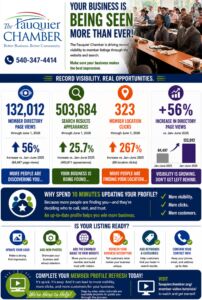
YOUR BUSINESS IS BEING SEEN MORE THAN EVER!
We continue to see year over year growth in our Member Business Awareness Campaign. Click the image to see the full version.
MANAGING EVENTS
Register for an Event
See an event that you and your team want to attend? We can show you how easy it is.
**You must be listed as an active representative of the member business in order to receive all member benefits including member pricing**
Submit an Event
Have an event you want to promote on the Chamber's calendar?
Save & Share Events
Is there an event you want to attend but are afraid you may forget? Know someone else who may be interested in attending as well?
See Who has Registered for an Event
Wish you could see if that one business you have been trying to meet may have registered for an event that you will be attending?
**will only show active members who have registered for a Chamber event**
Running Low on Bandwidth?
For a small fee ($25), we will provide you with recommended changes for your business directory page. For an additional $25, we are happy to implement the recommended changes. Give us a call at 540-347-4414 or email to mailbox@fauquierchamber.org
MEMBER PROFILE MANAGEMENT
Set Up for Auto Pay
Want a safe, secure, and convenient way to pay your Chamber invoices?
Update your Company Profile
Be sure that your brand identity is represented properly on your directory page. Add keywords, your logo, images & videos plus many others so you can be sure you are getting noticed!
Pay an Invoice Online
You can easily access your current balance and make full or partial payments online using the Member Information Center.
Chamber Member Badges
Studies have shown that again and again, when a consumer sees that business is a member of their Chamber of Commerce, they are statistically more likely to engage.
Add your Logo to your Directory Page
Despite our best efforts, only 41% of active members have their logo associated to their profile. Logos for the remaining 59% are visible not only on their directory pages but also their QuickLink tile.
MEMBERSHIP MARKETING
Submit a Hot Deal
Having a sale? Seasonal promotion? Submit a Hot deal to drive awareness.
Submit a Member to Member
Posting a member to member deal is a great way to build relationships using your products and services.
Submit a News Release
Since January 2022, we posted 250+ News Releases promoting news and updates from 100+ members. Our News Release page is one of our top performers.
Submit a Job Opening
Job opportunities posted to the Chamber's website get noticed! Expand your search efforts without additional costs.
Membership Visibility Stats
Want to see the activity your directory page is getting with regards to impressions, clicks to your website, and other metrics?
Member Referral Report
Since 2022, the Chamber has referred 350+ members 700+ times! Want to see how many your business has gotten?